


- Wall entry kit compatible with PetSafe Electronic Smart Doors for seamless integration.
- Self-framing tunnel for walls with a thickness of 4-3/4" to 7-1/4".
- Optional 2" wall extension available for large door flaps.
- White wall liner creates a watertight tunnel, preventing debris and water damage.
- Installation hardware, cutting template, and detailed instructions included for easy setup.
PetSafe Wall Kit for the Electronic Smart Doors
Fast & Free Shipping in the USA.
Satisfaction Guarantee -
Couldn't load pickup availability
- Wall entry kit compatible with PetSafe Electronic Smart Doors for seamless integration.
- Self-framing tunnel for walls with a thickness of 4-3/4" to 7-1/4".
- Optional 2" wall extension available for large door flaps.
- White wall liner creates a watertight tunnel, preventing debris and water damage.
- Installation hardware, cutting template, and detailed instructions included for easy setup.
Size & Measurement Guide
Refund policy
We have a 30-day return policy, which means you have 30 days after receiving your item to request a return.
To be eligible for a return, your item must in new, resellable condition. Pet doors that have been installed are not eligible for return. Custom orders are final sale and not eligible for return.
To start a return, you can contact us at customerservice@petdoors.com. Please note that returns will need to be sent to the following address: 254 Granada Drive, San Luis Obispo CA 93401
If your return is accepted, we’ll send you a return shipping label, as well as instructions on how and where to send your package. Items sent back to us without first requesting a return will not be accepted.
You can always contact us for any return question at customerservice@petdoors.com.
Damages and issues
Please inspect your order upon reception and contact us within 7 business days if the item is defective, damaged or if you receive the wrong item, so that we can evaluate the issue and make it right.
Exceptions / non-returnable items
Custom products are final sale and not eligible for return.
Exchanges
We do not offer exchanges. The fastest way to ensure you get what you want is to return the item you have, and once the return is accepted, make a separate purchase for the new item.
European Union 14 day cooling off period
Notwithstanding the above, if the merchandise is being shipped into the European Union, you have the right to cancel or return your order within 14 days, for any reason and without a justification. As above, your item must be in the same condition that you received it. You’ll also need the receipt or proof of purchase.
Refunds
We will notify you once we’ve received and inspected your return, and let you know if the refund was approved or not. If approved, you’ll be automatically refunded on your original payment method within 10 business days. Please remember it can take some time for your bank or credit card company to process and post the refund too.
If more than 15 business days have passed since we’ve approved your return, please contact us at customerservice@petdoors.com.
The table below shows manufacturer policies for returns. In all cases, the items must be uninstalled and in original condition. All items that ship from PetDoors.com warehouse or are drop-shipped from a different warehouse have a 30-day return policy.
Items shipped from PetDoors.com warehouse, after 30 Day Rules (non-Endura Flap products):
- After 30 days, Items that are returned have a 15% restocking fee.
- After 60 days, Items that are returned have a 20% restocking fee.
- After 90 days, Items that are returned have a 35% restocking fee.
- Items cannot be accepted after 120 days.
After 90 Day Rules for Endura Flap Products:
- After 90 days, Items that are returned have a 15% restocking fee.
- After 120 days, Items that are returned have a 20% restocking fee.
- After 150 days, Items that are returned have a 35% restocking fee.
- Items cannot be accepted after 365 days.
Time frames begin the day that you receive your order. Please understand that we as PetDoors.com have no control over drop-shipper restrictions, and if your item was drop-shipped from a different manufacturer warehouse, it is very unlikely that a return will be accepted past the 30-day time frame.
Do you charge shipping for returns? We will send you a label for all returns in the US, but the return label is not free and is charged to your account. We do not refund any of the original shipping charges initially paid on the order.
If you are not satisfied with your purchase for any reason, and need to return pet door products please email customerservice@petdoors.com or call (800) 826-2871 to submit a return request for a Return Merchandise Authorization (RMA) number within 30 days of receipt (90 days for Endura Flap products). To receive a refund of the merchandise cost the return item must be in original, resalable condition within 30 days of receipt for a full refund on the product cost.
When shipping returns back please make sure to package them properly to prevent damage. The label will have the proper return address already on it, as some items will need to go back to the drop ship company they originated from. All refunds will amount to the cost of the item, including taxes if applicable. We do not refund paid shipping. We process returns daily with the exception of weekends and holidays.
Company Name |
Ships from Mfr. |
Return Policy |
| Pet Door Products | Yes | No Returns |
| Endura Flap | No | 90 Days |
| Liberty Pet Doors | No | 30 Days |
| Hale Pet Doors | Yes | 30 Days |
| High Tech Power Pet | Yes | 30 Days |
| Ideal Pet Products | Yes | 30 Days |
| Magnador | Yes | 30 Days |
| Pet Door Guys | Yes | No Returns |
| Utah Pet Access | Yes | No Returns |
| Petsafe | Yes | 30 Days |
| Pride Pet Doors | No | 30 Days |
| Watchdog | Yes | 30 Days |

PetSafe Wall Kit for the Electronic Smart Doors
 Product Details
 Sizing & Fit
 Installation Guide
 Videos
 FAQs
FAQs
 Reviews
 Product Details
Product Details
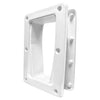
Transform your living space with the PetSafe Wall Kit for Electronic Smart Doors. This innovative wall entry kit allows you to install your PetSafe Electronic Smart Door seamlessly into walls with a thickness of 4-3/4" to 7-1/4". The self-framing tunnel extension ensures a clean and professional look, while the white wall liner adds a watertight barrier to protect your walls from water and debris.
Installing your PetSafe Electronic Smart Door has never been easier, thanks to the telescoping tunnel design. This unique feature allows for quick framing of wall cutouts, ensuring a perfect fit every time. For those with larger door flaps, an optional 2" wall extension is available to accommodate thicker walls.
Not only does the PetSafe Wall Kit provide a secure, watertight seal, but it also comes with everything you need for a hassle-free installation. The kit includes an exterior frame, tunnel, installation hardware, cutting template, and detailed instructions, so you can confidently install your electronic pet door without worry.
Features:
- Enables wall installation of PetSafe Electronic Smart Doors for flexible placement options.
- Telescoping tunnel design for quick and easy framing of wall cutouts.
- Optional 2" extension for walls thicker than 7-1/4" (large door flaps only).
- Watertight white wall liner prevents water and debris infiltration.
- Complete kit includes exterior frame, tunnel, installation hardware, cutting template, and instructions.
 Sizing & Fit
Size Chart
| FLAP SIZE | ROUGH CUT OUT |
|---|---|
| Small | 8 3/8"w x 14 3/4"h |
| Large | 16 1/8"w x 23 5/8"h |
Do not know which size to get? Here is a measurement guide to help you out
 Reviews
Customer Reviews


Request Freight Quote
Track heights exceeding 106 inches (107" or higher) may require additional shipping charges. Please provide your contact information for a custom freight quote, and our team will follow up during normal business hours.
